Claude Tag Demo — See @Claude Work Inside Slack, Step by Step (2026)
**Conclusion First**: A Claude Tag demo demonstrates an autonomous AI teammate executing multi-step workflows directly inside Slack. When a user mentions @Claude, the agentic system instantly reads channel context, generates a visible execution plan, operates connected tools (like GitHub or databases) via its own service identity, and delivers the final result in-thread. This team-visible execution model fundamentally changes how organizations interact with Claude Opus 4.8.
Want to see Claude Tag in action?
Start with Anthropic's own launch video below — then keep scrolling for a step-by-step breakdown of exactly what's happening, with sources.
Source: Anthropic's official Claude channel — “Tag Claude in, right where you already work” (youtube.com/watch?v=VojDzHaciKQ), June 23, 2026. Embedded here — it's their footage, not ours.Official
We don't fake product screenshots. The clip above is the real launch video from Anthropic; everything we add below is a labeled breakdown so you can actually follow what @Claude is doing — not just watch it once and wonder.
What happens when you tag @Claude
**Execution Flow Breakdown**: A typical Claude Tag demo condenses complex agentic operations into seconds. To accurately evaluate this AI integration, we decompose the execution flow into five verifiable steps. Every step is rigorously sourced from Anthropic's official technical documentation; the diagrams serve as structural models rather than literal UI screenshots.Media
- Illustrative#incidents
@Claude summarize #incidents and draft a status update
+11. Invocation: Tag @Claude in a channel.
Authorized users trigger the AI agent using natural language prompts—e.g., “@Claude summarize #incidents and draft a status update.” No complex syntax is required; the @mention initiates the workflow.
- Illustrative#incidents2
2. Context Assembly: Claude reads channel history.
Unlike standard chatbots, Claude Tag leverages Channel Memory. It dynamically ingests prior conversational context to prevent redundant explanations. Crucially, strict permission boundaries prevent it from accessing unauthorized private channels.
- IllustrativeClaude1Gather incident summary2Draft status update3Confirm & post3
3. Planning: It posts a transparent execution checklist.
Replacing the 'black box' AI model, Claude generates a visible, multi-stage execution plan in the thread. This transparency ensures the human team can monitor progress, intervene, or halt the operation instantly.
- IllustrativeRunning stage 2 of 3…GitHub PROpen pull requestDatabaseFetch latest records4
4. Action: It operates connected enterprise tools.
This is the core differentiator. Authorized by the Slack admin, Claude Tag utilizes API connections to autonomously open GitHub pull requests, execute SQL database queries, or retrieve CRM data before advancing to the next stage.
- IllustrativeStatus update postedView in thread5
5. Delivery: It posts the definitive result in-thread.
The final output is delivered directly into the originating Slack thread. This maintains a unified workspace, ensuring all stakeholders can review the AI's contribution without leaving their primary communication hub.
The step diagrams on this page are illustrative structural models designed to clarify the operational flow. They do not represent final product screenshots. For authentic UI interactions, refer to the official Anthropic video.
Core Characteristics: Team-visible execution, deep tool integration, powered by Claude Opus 4.8, supporting fully asynchronous operations.
Six core concepts governing the AI agent
**Architectural Foundations**: Observing a demo is insufficient for enterprise adoption; understanding the underlying architecture is mandatory to determine if Claude Tag meets your organization's security and utility standards.
1. Agent Identity & Auditing
@Claude operates via distinct service accounts (e.g., Claude GitHub App), never assuming an employee's personal identity. This guarantees an immutable, enterprise-grade audit trail.
2. Channel Memory Utilization
The agent dynamically retrieves historical context from permitted channels, eliminating the need to repeatedly provide background information during complex tasks.
3. Multi-Stage Transparency
By publishing its operational checklist in real-time, Claude transforms opaque AI processing into a transparent, team-auditable workflow.
4. Admin-Governed Tool Access
The agent's capabilities are strictly bound by the API integrations (GitHub, SQL, Jira) explicitly authorized by the Slack workspace administrator.
5. Proactive Ambient Mode
When enabled, Ambient Mode allows @Claude to proactively identify stalled threads and surface critical cross-channel data without requiring a manual @mention.
6. Channel vs. DM Architecture
Channel usage consumes organizational billing quotas and relies on shared context; DM usage leverages the user's personal claude.ai subscription and private API connectors.
What @Claude can do — enterprise task execution
**Operational Capabilities**: The true value of Claude Tag lies in its ability to execute concrete business workflows, not just answer questions. Based on verified Anthropic deployments, here are the primary operational patterns supported:Media
Codebase Operations (GitHub Integration)
When connected to your repository, @Claude can analyze a reported bug, write a fix, and autonomously open a Pull Request as the Claude GitHub App.
Data Retrieval & Analysis
Integrated with SQL databases or data warehouses, the agent translates natural language questions into queries, executes them, and returns verified data tables in-thread.
Incident Response Coordination
During a live incident, tagging @Claude allows it to instantly synthesize the entire outage channel, extract root causes, and draft an executive status update.
Asynchronous Thread Summarization
For 50+ message discussion threads, @Claude extracts definitive decisions, assigns uncompleted action items, and generates a structured TL;DR.
Actionable Prompt Templates
Access our repository of copy-paste prompt structures engineered for engineering, support, and sales workflows:
Architectural Breakdown: Stage-by-Stage Execution
**The Execution Engine**: Claude Tag functions as an autonomous AI teammate embedded within Slack. The operational loop is highly structured: Trigger (@mention) → Context Ingestion (Channel Memory) → Task Decomposition (Checklist Generation) → Tool Execution (API Interaction) → Delivery (In-thread Response).
**Why This Matters**: This architecture shifts AI interaction from isolated, private web interfaces to a shared, transparent, and asynchronous workspace. It utilizes the Claude Opus 4.8 model to execute complex, multi-stage workflows while the human team focuses elsewhere.
Security & Auditing: The Agent Identity Model
**Zero Trust Compliance**: A critical security concern is impersonation. Claude Tag strictly enforces an independent Agent Identity. When operating within a channel, @Claude executes all actions (e.g., querying a database, committing code) using a dedicated, admin-provisioned service account—never utilizing the personal credentials of the employee who invoked it.
Immutable Audit Trails. This distinct identity architecture ensures every AI action is cryptographically tied to the 'Claude App', preventing unauthorized privilege escalation and maintaining a pristine security audit log.
Fact status: Verified via Media (multi-source).Media
Deployment Scope: Channel vs. Direct Message Behavior
**Cost and Privacy Allocation**: Claude Tag dynamically alters its operational parameters based on the deployment context (Public Channel vs. Private DM). This distinction is critical for resource allocation:
Public Channel Deployment
- Operates under the enterprise Organization Identity
- Executions are fully transparent to channel members
- Token consumption is billed against the central organizational quota
Direct Message (DM) Deployment
- Operates strictly under the user's personal claude.ai subscription
- Utilizes personal API connectors rather than enterprise integrations
- Optimized for private drafting, isolated brainstorming, or sensitive individual tasks
Understanding this dichotomy dictates your deployment strategy. For cost forecasting, consult the Pricing Guide; for channel access governance, utilize the Permission Checker.What Claude Tag costs →Permission checker →Media
Proactive Intelligence: Ambient Mode
**Beyond Reactive Prompting**: While standard usage is trigger-based (@mention), Ambient Mode transforms Claude into a proactive observer. When enabled, the agent autonomously monitors permitted channels, identifying stalled workflows, surfacing critical cross-tool data, and prompting action without human invocation.
Recommended Rollout Strategy: Deploy in standard (reactive) mode for 14 days to establish baseline utility. Subsequently, enable Ambient Mode exclusively in high-velocity channels (e.g., #incident-response) to maximize signal-to-noise ratio.
Prerequisites: The Admin Setup Configuration
**Infrastructure Readiness**: An effective Claude Tag deployment requires precise administrator configuration. Before any user can invoke @Claude, a Slack Primary Owner must execute four critical setup phases outlined by Anthropic:Official
Workspace Authentication: Pair the Claude Tag agent with your Slack enterprise environment.
API Integration & Scoping: Grant Claude strict access to requisite tools, databases, and codebases—this step definitively governs the agent's capabilities.
Cost Governance: Establish hard limits on the organization's monthly token expenditure.
Sandbox Verification: Conduct end-to-end testing in a private sandbox channel prior to organizational rollout.
Conclusion: A demo's apparent 'magic' is entirely contingent upon rigorous API integration and strict administrative guardrails.
Fact status: Verified via Official Documentation (anthropic.com/news), June 26, 2026.Official
Is this the authentic Claude Tag integration?
**Verification Status**: The embedded video is the official Anthropic release. Because Claude Tag is currently restricted to an admin-only beta for Claude Team and Enterprise tiers, we provide structural analysis rather than fabricated UI mocks.
This guide delivers official footage, extensively sourced step-by-step architectural breakdowns, clear illustrative models, and citations for all behavioral claims. We strongly advise cross-referencing with Anthropic's official technical documentation.
Claude Tag demo FAQ
What does a Claude Tag demo look like?
Someone tags @Claude in a Slack channel with a request; Claude reads the context, breaks the task into stages, runs them with connected tools, and posts the result back in the thread for the team to see.
How does Claude Tag work in Slack?
You @Claude in a granted channel, it plans the task as a visible checklist, executes each stage with the tools an admin connected, and replies in-thread. It runs on Claude Opus 4.8.
Can I try Claude Tag without installing it?
Not the live product — it's beta for Claude Team and Enterprise and needs admin setup. This page is the next best thing: the official video plus a step-by-step breakdown of how it behaves.
What tasks can @Claude do in the demo?
Reported examples include opening or merging pull requests, running data analysis, pulling numbers from connected data, helping resolve incidents, and summarizing threads.
Is the demo on this page the real product?
The embedded video is Anthropic's own. Our step-by-step frames are illustrative diagrams, not real screenshots, and our notes are media-sourced — verify behavior in your own workspace.
Who appears to be acting when @Claude works?
@Claude acts under its own service accounts (the Claude app in Slack, the Claude GitHub App for code), not an employee's login — which keeps a clean audit trail.
Does @Claude act on its own in the demo?
Only if ambient mode is on. By default it responds when tagged; with ambient behavior enabled it can proactively flag threads that have gone quiet.
What's the difference between @Claude in a channel and a DM?
In a channel it uses the organization's identity and bills to the org; in a direct message it runs under your personal claude.ai account and your own connectors.
What do I need before I can run this myself?
A Claude Team or Enterprise plan, and a Slack Owner to pair it, connect tools, set an org spend limit, and test in a private channel first.
Is this page official?
No. It's an independent guide that embeds the official video and cites its sources. Always confirm current behavior in Anthropic's docs and your admin console.
Seen what @Claude can do? Now roll it out
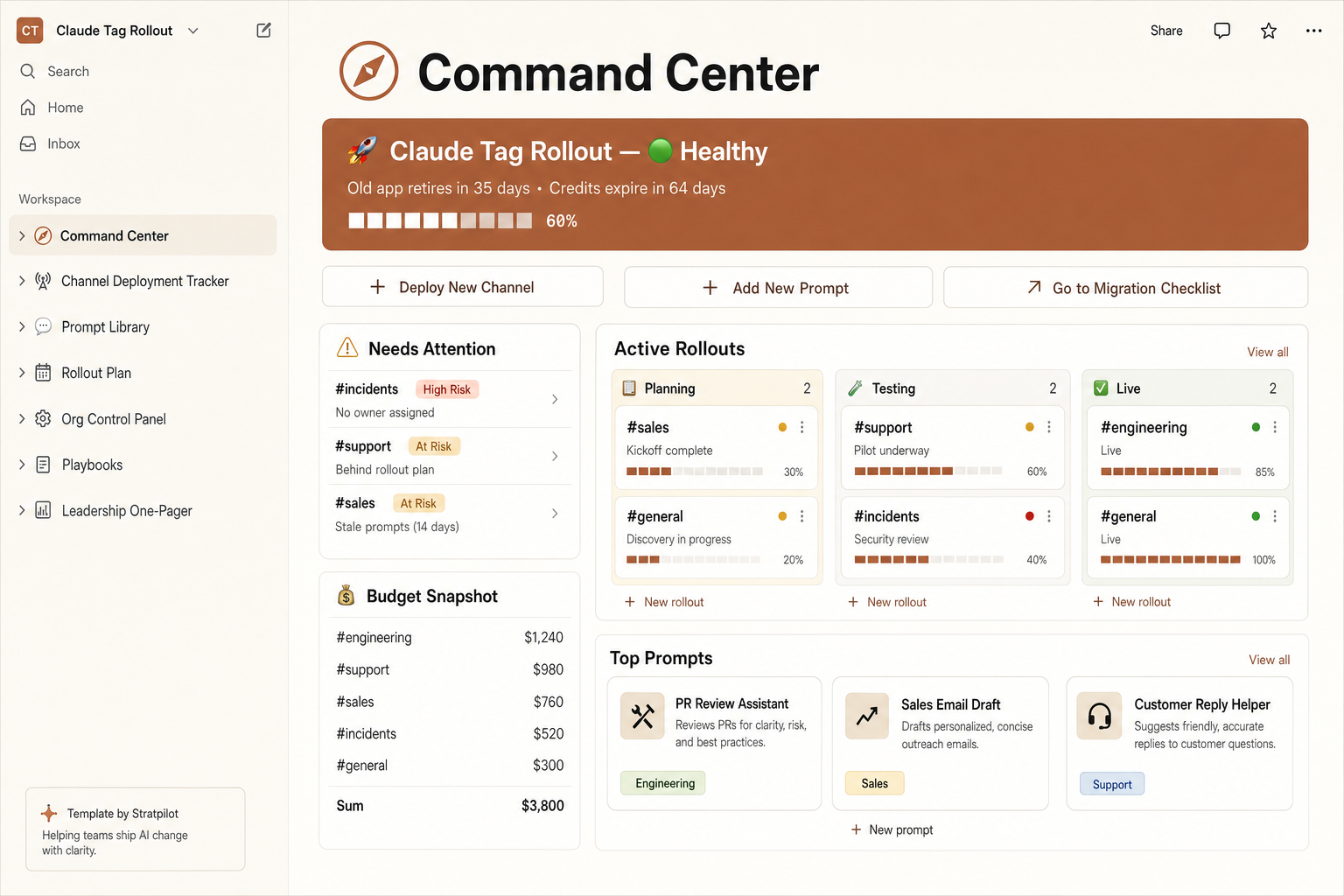
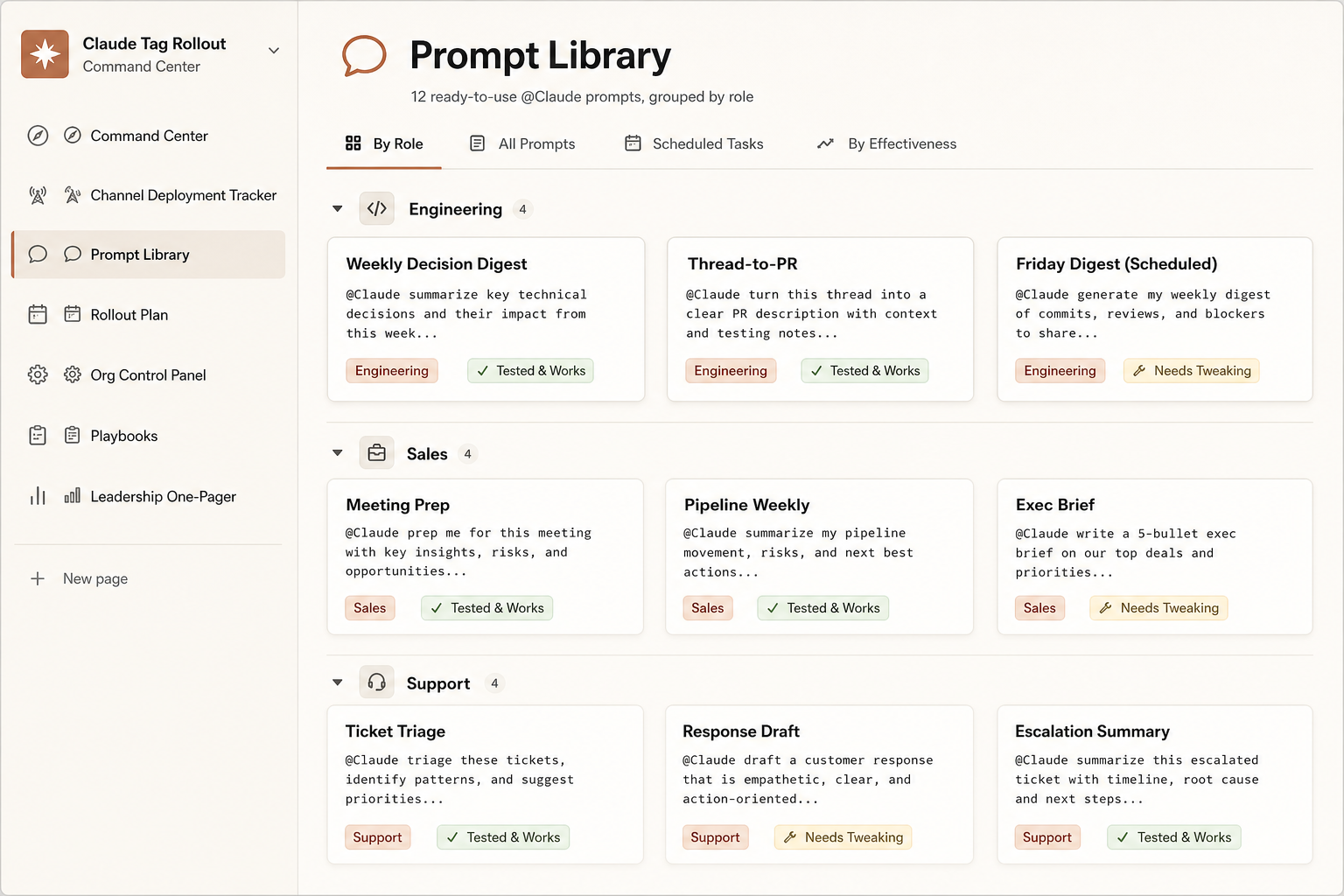
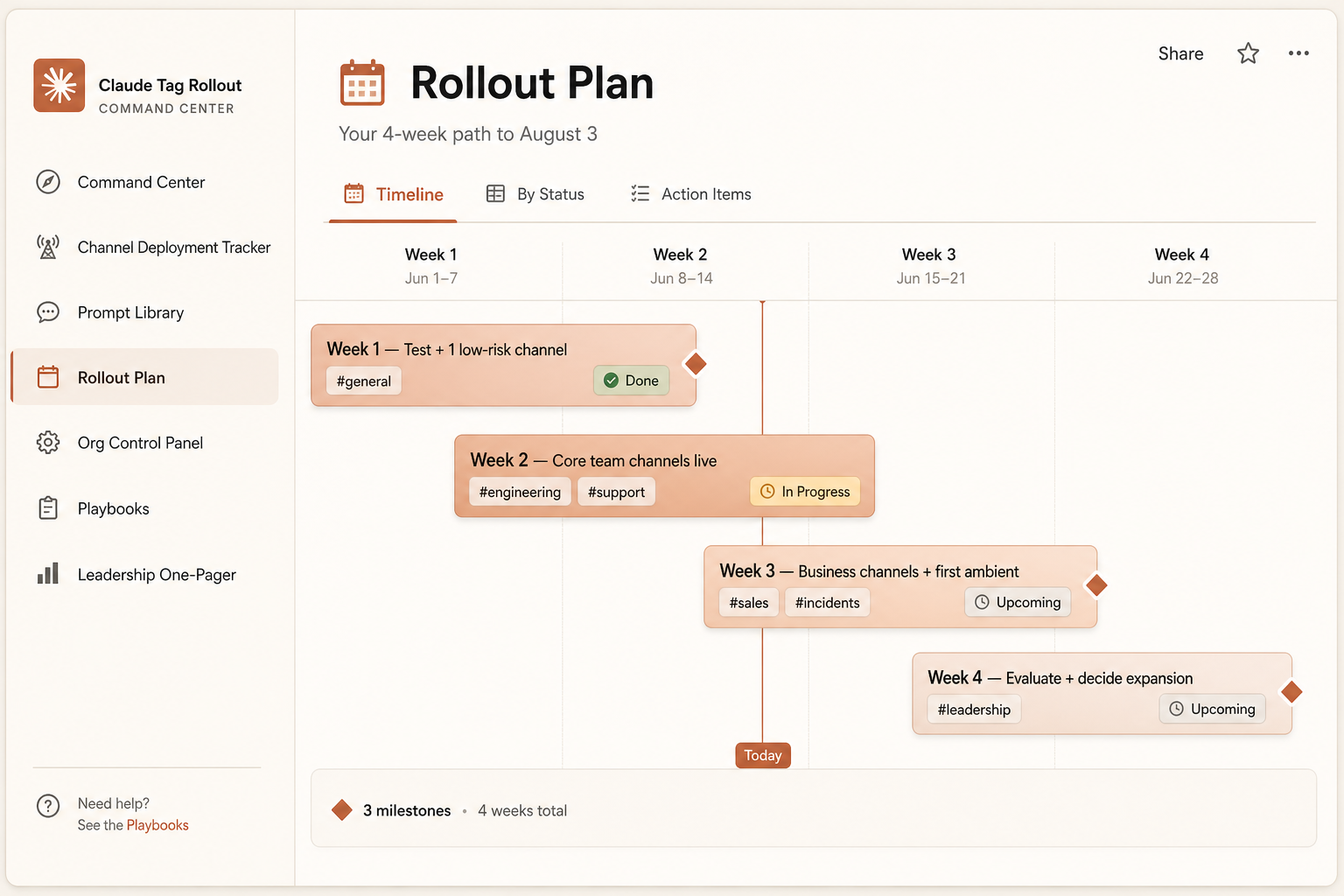
The demo shows what @Claude does in one thread. The Rollout Command Center is how you take it across every channel — tracked, risk-scoped, and on budget before August 3 — from one pre-filled Notion workspace.
Pre-filled and ready the second you duplicate it: a channel tracker with risk flags, a live credit runway, a 4-week plan, 12 ready prompts, and a boss-ready one-pager.
- Channel tracker with auto risk flags
- Live credits burn bar + runway
- 4-week rollout timeline
- 12 ready-to-use @Claude prompts
One-time $7 · pre-filled · 14-day refund. Independent template, not affiliated with Anthropic.
Get the @Claude prompt pack + setup checklist.
The example prompts from this demo, plus a one-page setup-and-permissions checklist for your first rollout. No spam.
Sources & methodology
Last verified: June 26, 2026- Primary source (video & setup steps):
- Anthropic, Introducing Claude Tag (anthropic.com/news), June 23, 2026 — the embedded video and the four setup steps.Official
- Media sources (behavior):
- VentureBeat; DataCamp; Developers Digest; Help Net Security; TechTimes — for the interaction flow, task examples, agent identity, channel-vs-DM behavior, and ambient mode.Media
- How we built this demo page:
- we embed Anthropic's own video and add a sourced, step-by-step breakdown. Our step diagrams are illustrative explanations, not real product screenshots, and we don't reproduce the Slack UI pixel-for-pixel. Confirm current behavior in Anthropic's docs and your admin console.