Claude Tag Ambient Mode — Should You Turn It On? (And Where)
**Ambient mode** makes Claude proactive: it monitors a channel, flags relevant information from across your connected tools, and follows up on threads that have gone quiet — all **without being tagged**. It's **off by default**. The real question isn't whether to use it, it's **where**: on for internal-only channels, off for anything client-facing or regulated.
For Claude Team & Enterprise · Beta · Official + media-reported
Should you turn ambient mode on in this channel?
Answer four quick questions about one channel — its type, sensitivity, traffic, and whether your team trusts Claude's output yet. We'll give you an on/off recommendation, the reason, and a cost flag. Nothing leaves your browser; we never ask for channel names.
1Channel type?
2Sensitive data (secrets, customer, health, legal)?
3How active is the channel?
4Does the team already trust Claude's output here?
What ambient mode actually does
By default Claude Tag is **reactive** — you @-mention it, it works, it replies. Turn ambient mode on and it becomes **proactive**: it watches the channel and speaks up when it thinks you'd want to know something. In practice that's three behaviors, and it **doesn't report from private channels**.
Surfaces context you didn't ask for
Relevant updates from the channels and tools it's connected to — pushed to you, not pulled by you.
Connects information across channels
But only the ones an admin has authorized it to learn from — never beyond its granted scope.
Chases loose ends
Follows up on threads or tasks that have gone quiet without resolution, and can schedule work for itself.
Those are exactly the behaviors that make it feel like a teammate instead of a tool — and exactly why where you enable it matters so much. A proactive agent in the right channel is a force multiplier; in the wrong one, it's a liability.
MediaBehaviors are media-reported and consistent with Anthropic's description.
Reactive vs ambient — what changes when you turn it on
The switch changes four things at once: what triggers Claude, how it behaves, how much it costs, and how much risk it carries. Knowing the trade across all four is what turns 'should we?' into 'where should we?'.
A passive chatbot and an always-on ambient agent have very different risk profiles. Review your posture before flipping the switch — the convenience is real, but so is the change in what the agent is doing on your behalf.
Where to turn ambient mode on vs off
Whether to enable ambient mode isn't a yes-or-no question — it's a **where** question, and getting the where right is the whole game. Map each channel to a trust boundary first, then apply this matrix. When in doubt, leave it off; you can always enable it later.
If your Slack workspace is one company's data and one team's work, turn ambient mode on and enjoy it — it's the best part of Claude Tag. The moment outside collaborators, clients, or regulated data enter the picture, the calculus flips.
The context-bleed risk — multi-client & regulated channels
Here's the failure mode that matters most. The moment a proactive teammate is 'surfacing relevant information from across channels,' **relevance becomes the judge** of what crosses the line between Client A and Client B. That's a boundary you don't want an algorithm drawing for you — so keep ambient off there.
Multiple clients in one operation
Proactive cross-channel surfacing is exactly where one client's context can appear in another's work.
Regulated or sensitive data
Health, financial, legal, HR — an unprompted message pulling context from elsewhere could expose something it shouldn't.
- Q2 renewal checklist sent to Alex
- Pricing update reviewed in standup
- Legal review turnaround confirmed
- Q3 roadmap alignment with Priya
- Customer call notes from today
- Security audit findings logged
What ambient mode costs — token usage & spend
An ambient channel doesn't wait to be asked, which means it doesn't wait to spend either. Claude processes channel activity continuously, billed at API rates to your organization, so a high-traffic channel can burn tokens far faster than on-demand use. The hotter the channel, the bigger the bill.
Per-channel spend cap
Over-limit task is declined outright — not silently cut. Set caps too low on an ambient channel and work can halt mid-flight.
Spend controls are your main protection. Set org-wide and per-channel caps; alerts fire at 75% and 95%. Set caps high enough that real work isn't blocked, low enough to catch a runaway, and estimate before you enable.
The governance question — proactive monitoring & editorial judgment
Ambient mode is a meaningful expansion of what enterprise AI does. It's not just responding to requests — it's **monitoring information flows** and making **editorial judgments** about what humans need to know. For regulated industries, that raises questions existing AI governance policies may not yet address. Decide deliberately, and document the decision.
Accountability wrinkle
When Claude acts autonomously across multiple channels, tracing which instance triggered a specific action is harder, and the audit trail for cross-channel ambient actions is still maturing.
Anthropic's own guidance
Keep ambient off until your team understands the failure modes. That's not a reason to avoid it — it's a reason to roll it out channel by channel.
MediaGovernance and attribution caveats are media-reported (VentureBeat, AgentConn).
How to enable or turn off ambient mode
Ambient mode is a **per-channel, admin-controlled** setting in the Claude admin console — it's **off by default**, and only a Slack Owner can change it. Enable it on a specific channel, or switch it off anytime; turning it off leaves normal reactive @Claude behavior in place.
Enable it deliberately, not globally — toggling it per channel is what lets you keep it on for internal work and off everywhere else. If a channel gets noisy or a boundary changes, switch it back off; nothing about the channel's reactive use breaks when you do.
Default: OFF for every channel until an admin turns it on.
When ambient mode is actually worth it
Turn it on where proactive nudges add value, not noise. A busy incident channel benefits from proactive follow-ups on unresolved threads; a quiet leadership channel probably shouldn't have an agent volunteering opinions unprompted. The test is simple: would a proactive human teammate help here, or annoy everyone?
Start on-demand
Run reactive @mention use for a couple of weeks so the team builds trust in the quality of Claude's output.
Review
Look at what Claude did well and where it needed correction.
Enable deliberately
Turn ambient on only in the channels where the review says proactive nudges clearly earn their keep — then add more, one at a time.
#incident-response
proactive follow-ups help
#leadership
keep it quiet, don't volunteer
Claude Tag ambient mode FAQ
What is ambient mode in Claude Tag?
An opt-in setting that makes Claude proactive — it monitors a channel, surfaces relevant info from across your connected tools, and follows up on quiet threads without being tagged. It's off by default.
Should I turn ambient mode on?
It's a where question, not yes/no. Turn it on for internal-only channels where all the data is yours; keep it off for client-facing or regulated ones.
What does ambient mode actually do?
Three things: surfaces context you didn't ask for, connects information across channels you've authorized, and chases loose ends nobody assigned. It doesn't report from private channels.
Is ambient mode on by default?
No. Claude Tag is reactive by default — it only acts when tagged. Ambient is admin-controlled and enabled per channel.
What's the context-bleed risk?
In multi-client or shared workspaces, proactively surfacing relevant info across channels can let one client's context appear in another's work. Keep it off there, and isolate that work in its own channel.
Does ambient mode cost more?
Yes — it processes channel activity continuously and bills at API rates to the org, so a high-traffic ambient channel burns tokens fast. Set per-channel spend caps.
What happens if I hit the spend limit with ambient on?
An over-limit task is declined rather than silently cut, so work can halt mid-flight if caps are set too low. Tune caps deliberately and watch the 75% / 95% alerts.
Is proactive monitoring a compliance concern?
It can be — ambient mode means an AI is monitoring channel activity and making editorial judgments about what to surface, which some governance policies don't yet cover. Document the decision.
How do I turn ambient mode off?
It's a per-channel, admin-controlled setting in the Claude admin console. Leave it off, or switch it off anytime; reactive @mention behavior stays in place.
When is ambient mode worth it?
Where proactive nudges add value, not noise — a busy incident channel benefits; a quiet leadership channel usually shouldn't have an agent volunteering unprompted.
Can I trust its judgment about what to surface?
Build trust first: run on-demand for a couple of weeks, review what it did well and where it needed correction, then enable ambient deliberately.
Is this page official?
No — independent guide with sources. Always verify current ambient options in your Anthropic/Claude admin console.
Track ambient mode where you run the rollout
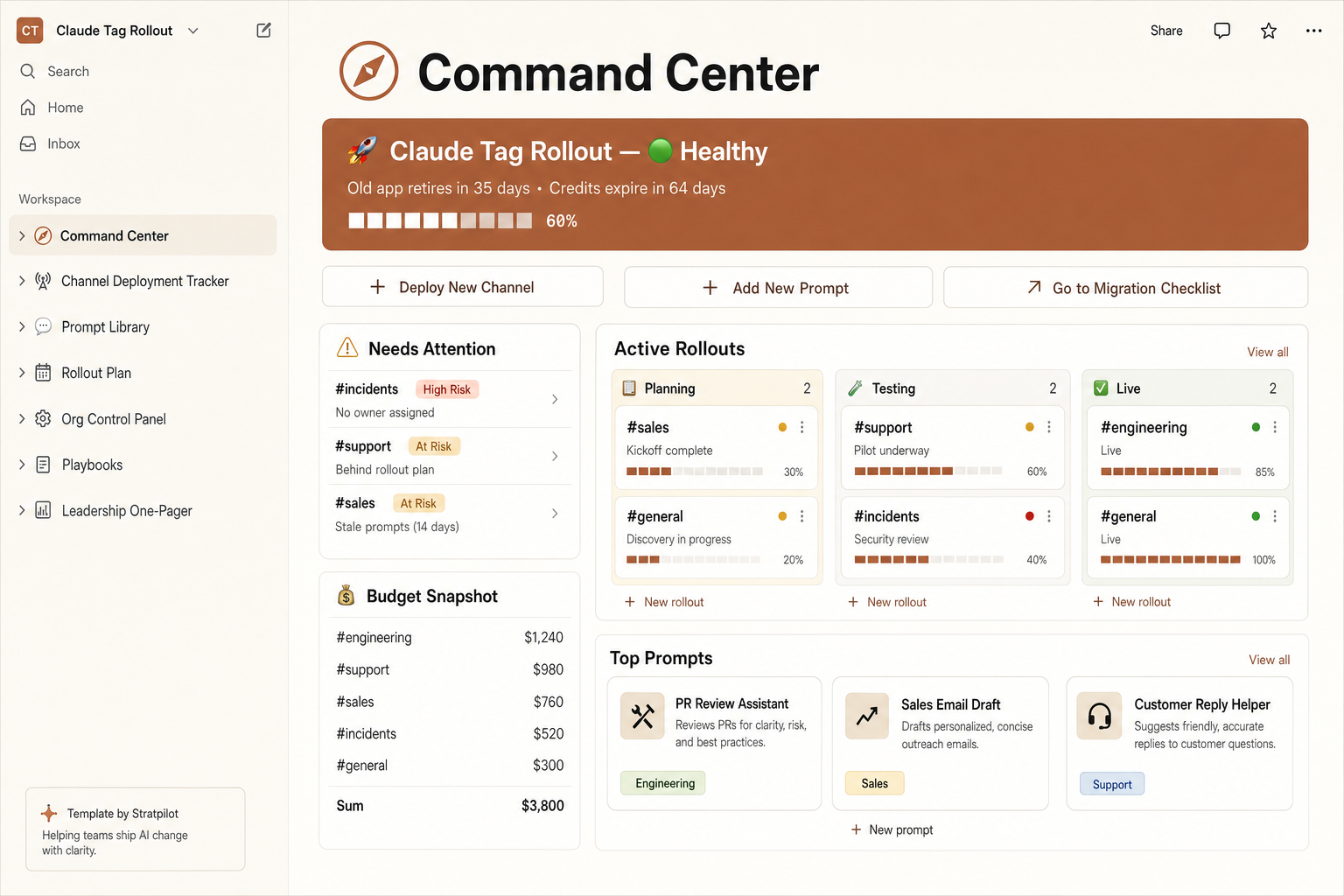
Ambient mode is a per-channel decision with real spend behind it. The Rollout Command Center logs ambient on/off, who approved it, and the credits it drives — alongside every other channel you're rolling out.
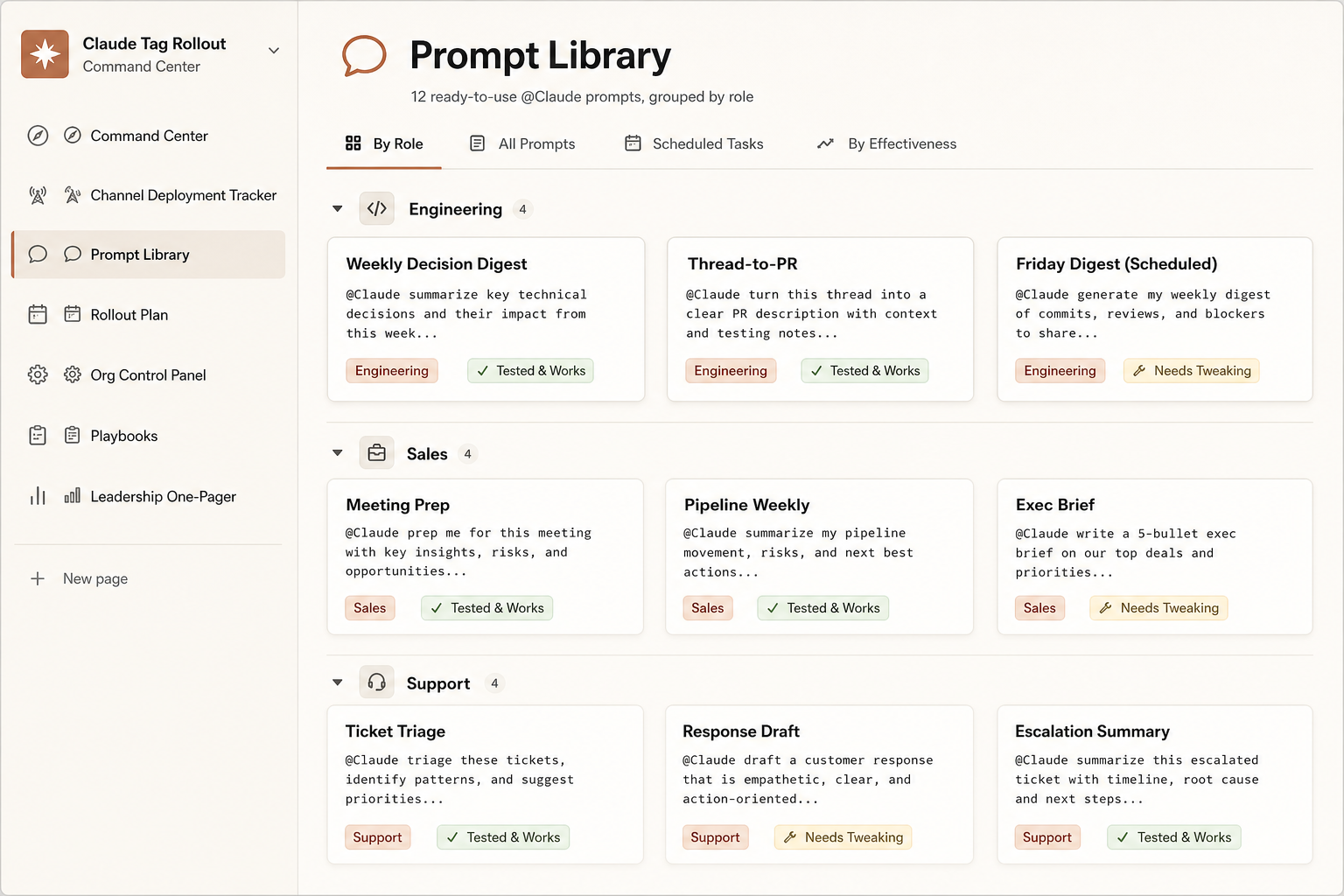
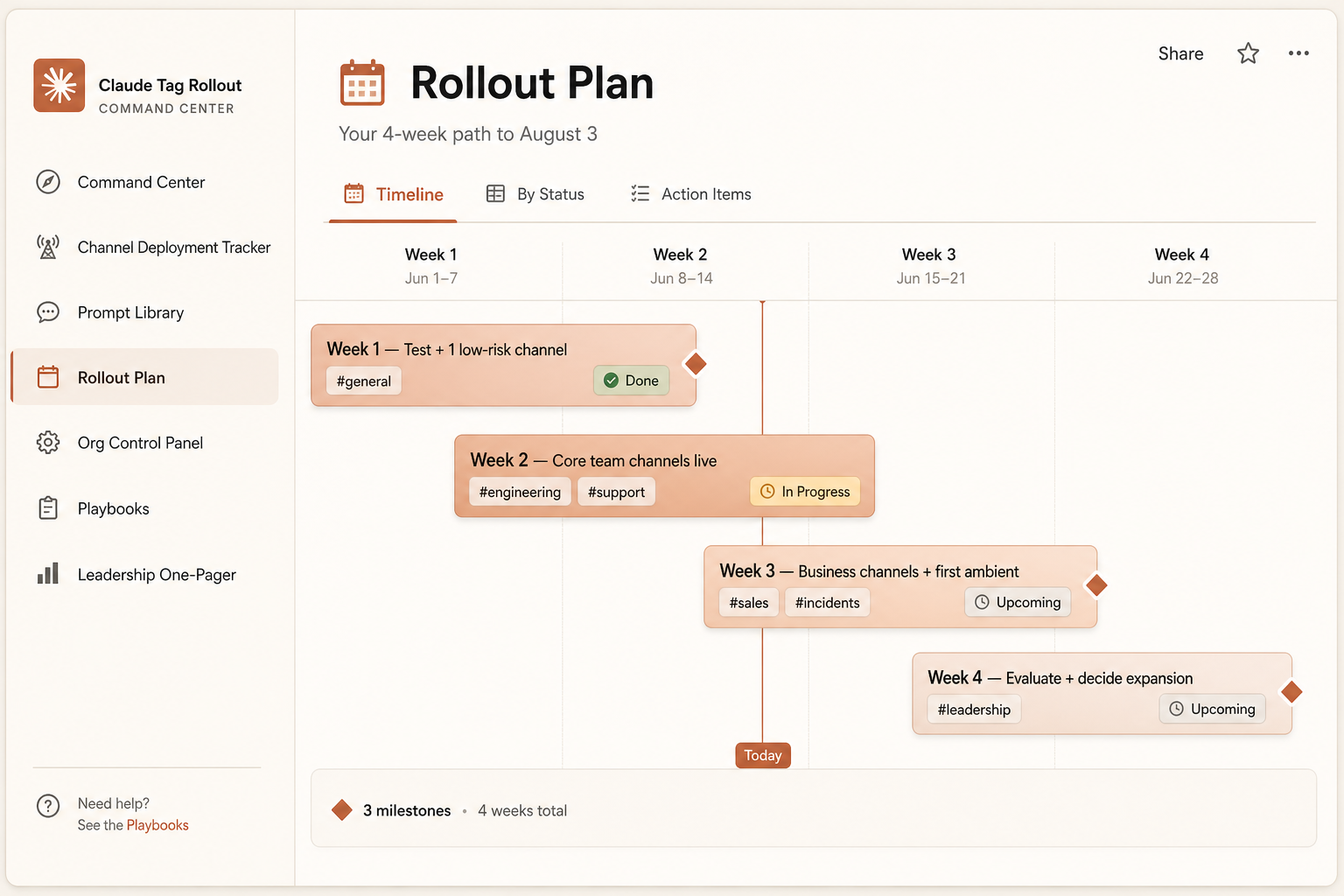
Pre-filled and ready the second you duplicate it: a channel tracker with risk flags, a live credit runway, a 4-week plan, 12 ready prompts, and a boss-ready one-pager.
- Per-channel ambient + approval log
- Live credits burn bar + runway
- Channel tracker with risk flags
- 4-week rollout timeline
One-time $7 · pre-filled · 14-day refund. Independent template, not affiliated with Anthropic.
Get ambient & beta updates
Ambient behavior is the most consequential — and fastest-changing — setting in Claude Tag's beta. We'll email you when its behavior, controls, or cost model change in ways that affect your decision. No spam, unsubscribe anytime.
Sources & how we keep this accurate
That ambient mode is opt-in, off by default, and admin-controlled is from Anthropic's announcement and Help Center. The where-to-enable framework, context-bleed risk, cost behavior, and governance caveats are from hands-on coverage and may change during the beta. Recommendations are our guidance, not a compliance guarantee.
Last verified: June 26, 2026
- AAnthropicOfficial
- TTygart MediaMedia
- DDataCampMedia
- VVentureBeatMedia
- ZZDNETMedia
- AAgentConnMedia
- LLushbinaryMedia
We are not affiliated with Anthropic or Slack. Always verify current ambient options in your Claude admin console, and keep a human in the loop for irreversible actions.