Claude Tag Examples — Copy-Ready @Claude Prompts for Slack (by Role & Task)
**Conclusion First**: The Claude Tag Examples Library provides a structured repository of verified @Claude prompts designed for enterprise Slack environments. Users can filter copy-ready prompt templates by department (Engineering, Sales, Support) and required tool integrations (GitHub, SQL, Jira). This ensures teams deploy highly structured, context-aware prompts that maximize Claude Opus 4.8's agentic capabilities while minimizing hallucinations.
No login · Client-side filtering · Anthropic-verified prompt structures
★ Example Card Library with filters — the core tool
**Immediate Utility**: Do not write prompts from scratch. Utilize this interactive library to filter Claude Tag examples by organizational role, task type, and connected enterprise tools. Copy the validated @Claude prompt directly into your Slack environment. All processing occurs client-side; no data leaves your browser.
14 examples
Each card shows the copy-ready prompt, where it came from, an illustrative output, why it's phrased that way, and which tools it needs.
Catch up on a thread
@Claude What got decided in this thread and what's still open?Decided: ship the retry fix Thursday. Open: who owns the rollback plan; staging soak time.
IllustrativeWhy it works. It asks for two concrete things — decisions and open items — so you get a usable summary, not a wall of text.
Fix a bug and open a draft PR
@Claude fix the bug in this thread and open a draft PROpened draft PR #1234 — null check in checkout.js, with test notes.
IllustrativeWhy it works. It scopes the task to the current thread so Claude uses that context, and asks for a draft so a human reviews before merge.
Investigate a latency spike
@Claude investigate this latency spike and open a PR with a fixPulled latency data, diffed the recent deploy, reproduced the slow query, opened a fix PR.
IllustrativeWhy it works. It names a clear, multi-stage goal and lets Claude work the stages in-thread where the team can follow along.
Summarize a PR discussion
@Claude summarize the open questions in this PR discussionThree open questions: migration order, feature-flag default, and rollback owner.
IllustrativeWhy it works. "Open questions" forces a decision-focused summary rather than a recap.
Triage a bug report
@Claude triage this bug report — severity, likely cause, and a suggested ownerSeverity: high. Likely cause: timeout in payments retry. Suggested owner: @payments.
IllustrativeWhy it works. It asks for a structured triage, so the reply is immediately actionable.
Draft a reply from your knowledge base
@Claude draft a reply to this customer using our help centerDrafted a reply citing the 'reset 2FA' article, with the exact steps.
IllustrativeWhy it works. Pointing at a specific source keeps the draft grounded instead of generic.
Summarize an incident thread
@Claude summarize this incident thread and draft a status updateTimeline of the outage + a customer-ready status update.
IllustrativeWhy it works. Two deliverables in one prompt — an internal summary and an external update.
Watch a channel and follow up
@Claude watch this channel, triage the backlog, and tag me only when neededMonitoring #support-backlog; will tag you on anything high-severity or stuck >24h.
IllustrativeWhy it works. It sets a clear escalation rule so ambient mode is helpful, not noisy.
Top accounts by spend
@Claude Top 20 enterprise accounts by spend, last 7 and 28 daysPosted a ranked table for both windows, with week-over-week deltas.
IllustrativeWhy it works. Specific metric + specific windows = a precise, repeatable query.
Pre-call briefing
@Claude I'm meeting Acme at 2 — what do I need to know?Briefing from CRM + recent threads: open opportunity, last ticket, key contacts.
IllustrativeWhy it works. A DM uses your personal account and connectors, which suits a personal briefing better than a channel.
Chase down a metric
@Claude chase down why signups dropped this week and post what you findSignups −18%; traced to a broken referral link on the pricing page.
IllustrativeWhy it works. "Post what you find" keeps the investigation visible to the whole channel.
Turn a thread into a plan
@Claude turn this thread into decisions, owners, and next stepsDecisions, owners, and next steps, laid out as a short table.
IllustrativeWhy it works. Naming the three outputs you want gives you a plan, not a recap.
Turn a discussion into a brief
@Claude turn this launch discussion into a one-page briefA focused one-page brief drawn from the launch thread.
IllustrativeWhy it works. Constraining it to "one page" forces a focused brief, not a transcript.
Answer from policy docs
@Claude answer this using our connected policy docsAn answer grounded in the connected policy docs, with the source noted.
IllustrativeWhy it works. Pointing at connected docs keeps the answer grounded in your real policy.
Example outputs are illustrations, not real @Claude responses.
Every example card, explained
- 1Tag
- 2Tool badge
- 3Card title
- 4Copy-ready prompt
- 5Source-tagged
- 6Illustrative output
- 7Why it works
- 8Tools needed
Fix a bug and open a draft PR
@Claude fix the bug in this thread and open a draft PROpened draft PR #1234 — null check in checkout.js, with test notes.
IllustrativeWhy it works. It scopes the task to the current thread so Claude uses that context, and asks for a draft so a human reviews before merge.
Implementation Protocol: Using these @Claude Examples
**Execution Strategy**: These Claude Tag examples provide structural foundations, not rigid incantations. To effectively deploy them within your Slack workspace, adhere to this three-step execution protocol:
Channel Authorization: Verify @Claude access.
The AI agent operates exclusively within channels explicitly authorized by the Slack workspace administrator. Invoking it elsewhere will fail silently.
Contextual Adaptation: Provide specific parameters.
Modify the template variables. Replace generic placeholders with your specific channel names, account IDs, and temporal constraints to ensure high-fidelity outputs.
Tool Dependency Check: Validate API integrations.
Advanced capabilities require active integrations. A codebase query necessitates the Claude GitHub App; data analysis requires SQL access. Verify the 'Needs' section on each card.
New to the flow?Watch a Claude Tag demo first →
Setting it up?Owner setup guide and permission checker →
Engineering examples
The most documented Claude Tag examples are engineering ones — it grew out of Claude Code, and Anthropic says 65% of its product team's code now comes from its internal version.
Catch up on a thread
@Claude What got decided in this thread and what's still open?Decided: ship the retry fix Thursday. Open: who owns the rollback plan; staging soak time.
IllustrativeFix a bug and open a draft PR
@Claude fix the bug in this thread and open a draft PROpened draft PR #1234 — null check in checkout.js, with test notes.
IllustrativeInvestigate a latency spike
@Claude investigate this latency spike and open a PR with a fixPulled latency data, diffed the recent deploy, reproduced the slow query, opened a fix PR.
IllustrativeSummarize a PR discussion
@Claude summarize the open questions in this PR discussionThree open questions: migration order, feature-flag default, and rollback owner.
IllustrativeEach action is attributed to Claude's own service accounts, not a person's login.
See how agent identity works →Support examples
Support is the other place these Claude Tag examples shine, because so much of the work already lives in Slack threads.
Triage a bug report
@Claude triage this bug report — severity, likely cause, and a suggested ownerSeverity: high. Likely cause: timeout in payments retry. Suggested owner: @payments.
IllustrativeDraft a reply from your knowledge base
@Claude draft a reply to this customer using our help centerDrafted a reply citing the 'reset 2FA' article, with the exact steps.
IllustrativeSummarize an incident thread
@Claude summarize this incident thread and draft a status updateTimeline of the outage + a customer-ready status update.
IllustrativeWatch a channel and follow up
@Claude watch this channel, triage the backlog, and tag me only when neededMonitoring #support-backlog; will tag you on anything high-severity or stuck >24h.
IllustrativeSales & ops examples
These Claude Tag examples need connected data — a database or CRM — but they're some of the highest-leverage.
Top accounts by spend
Prompt
@Claude Top 20 enterprise accounts by spend, last 7 and 28 daysSource
Posted a ranked table for both windows, with week-over-week deltas.
IllustrativePre-call briefing
Prompt
@Claude I'm meeting Acme at 2 — what do I need to know?Source
Briefing from CRM + recent threads: open opportunity, last ticket, key contacts.
IllustrativeChase down a metric
Prompt
@Claude chase down why signups dropped this week and post what you findSource
Signups −18%; traced to a broken referral link on the pricing page.
IllustrativePM, marketing & other roles
The same Claude Tag examples pattern works well beyond engineering — filter the library above for your role. A few starters:
@Claude turn this thread into decisions, owners, and next steps@Claude turn this launch discussion into a one-page brief@Claude answer this using our connected policy docsThese are labeled "ours-adapted" because we've phrased them from Claude Tag's documented behavior rather than a specific reported example — adapt freely.
Filter the library for your role →Prerequisite Matrix: API Tools & Permissions
**Integration Dependencies**: A prompt is merely text without the underlying API integration. The primary reason a Claude Tag execution fails is a missing backend connection. Cross-reference your intended prompt with the required enterprise integration below.
| If the prompt... | Required Integration | Admin Action |
|---|---|---|
| Opens or merges a PR | Required IntegrationThe Claude GitHub App | Configure GitHub |
| Returns metrics or a table | Required IntegrationConnected Database / SQL / CRM | Configure Data Source |
| Drafts from your help center | Required IntegrationConnected Google Drive / Confluence | Configure Knowledge Base |
| Watches a channel proactively | Required IntegrationAmbient Mode enabled | Enable Ambient Mode |
| Uses personal data for a briefing | Required IntegrationDirect Message Execution | Review DM Constraints |
Security Imperative: Before deploying @Claude to high-velocity channels, map your permission boundaries and establish strict token spend limits.
Access Permission Checker →Verification: Are these authentic @Claude outputs?
**Transparency Statement**: The prompt structures are 100% authentic and verified. The example outputs are illustrative models.
Because Claude Tag is restricted to an admin-only beta for Claude Team and Enterprise tiers, extracting live production transcripts violates confidentiality. The prompts provided here are rigorously sourced from Anthropic's official technical documentation and launch reporting. The outputs are engineered illustrations designed to demonstrate the expected data structure and tone. Always validate final behavior within your isolated admin sandbox.
Claude Tag examples FAQ
What are some Claude Tag examples?
Copy-ready @Claude prompts like "What got decided here and what's still open?", "fix the bug in this thread and open a draft PR", or "Top 20 accounts by spend, last 7 and 28 days." Filter the full library above by role and task.
Can I copy these @Claude prompts?
Yes — every card has a copy button. Adapt the wording to your channel, and check which tools the prompt needs (like GitHub) before you run it.
Are the example outputs real Claude responses?
No. The prompts are sourced from Anthropic's docs and reporting, but the example outputs are illustrative — written by us to show the expected shape, not captured from the live product.
What can @Claude do for engineering?
Reported uses include catching up a thread, fixing a bug and opening a draft PR, investigating a latency spike, and summarizing PR discussions.
What can @Claude do for support?
Triage a bug report, draft a reply from your knowledge base, summarize an incident thread, and — with ambient mode — watch a channel and follow up on unresolved tickets.
What can @Claude do for sales or ops?
Pull top accounts by spend, brief you before a call from CRM and thread context, and chase down why a metric moved. These need a connected data source or CRM.
Do these examples need extra setup?
Often yes — a prompt that opens a PR needs the Claude GitHub App connected; a metrics prompt needs a database. Each card lists what it needs and links to setup.
Will an example work in a DM the same as a channel?
Not always. In channels @Claude uses the organization's identity; in DMs it uses your personal claude.ai account. Personal briefings often fit DMs better.
Where do these Claude Tag examples come from?
Anthropic's launch post and docs, plus reporting from DataCamp and others. Prompts are labeled by source; we don't invent capabilities.
Is this page official?
No. It's an independent library that cites its sources. Confirm current behavior and connect tools in your own Claude admin console.
Get these prompts — plus the rollout around them
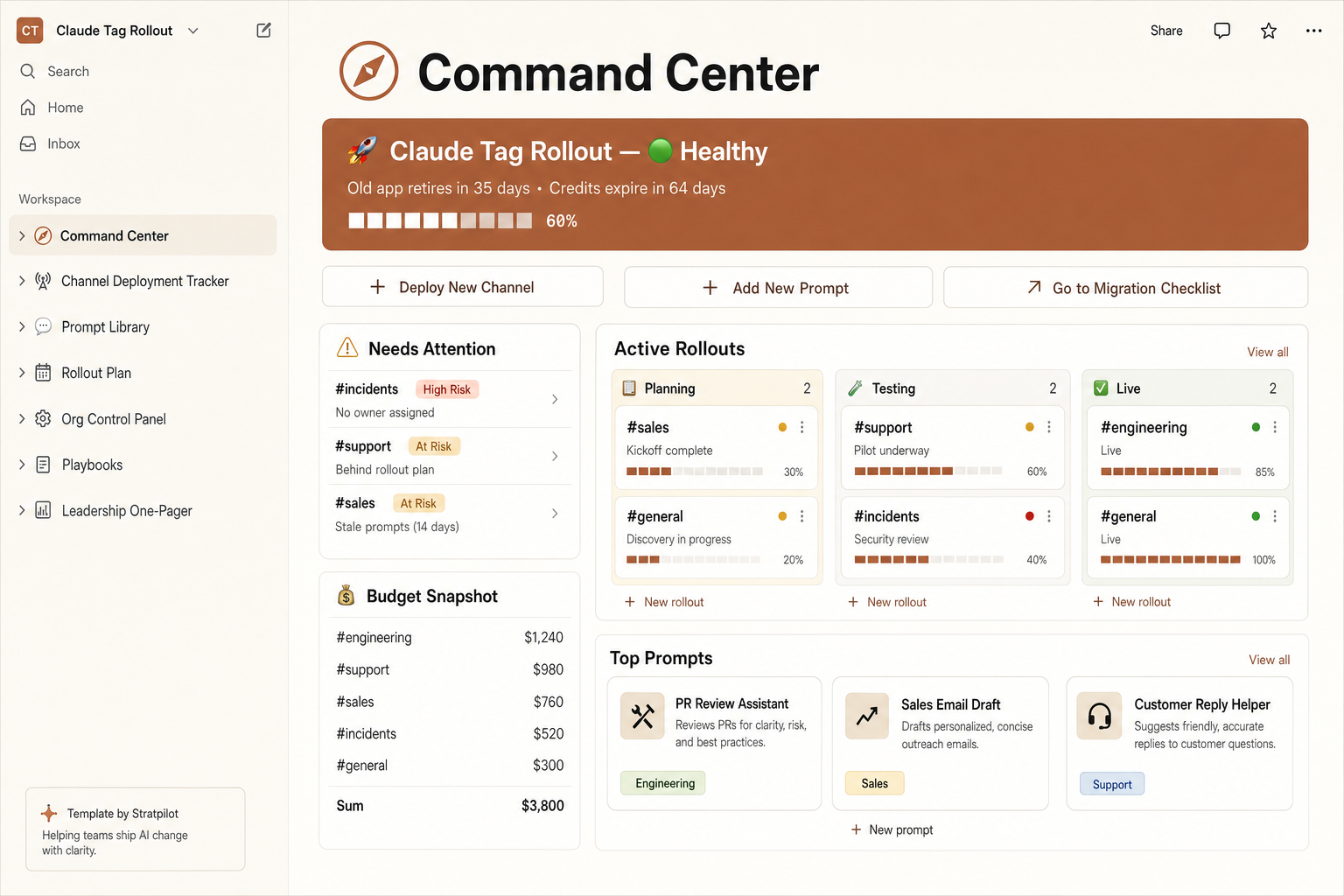
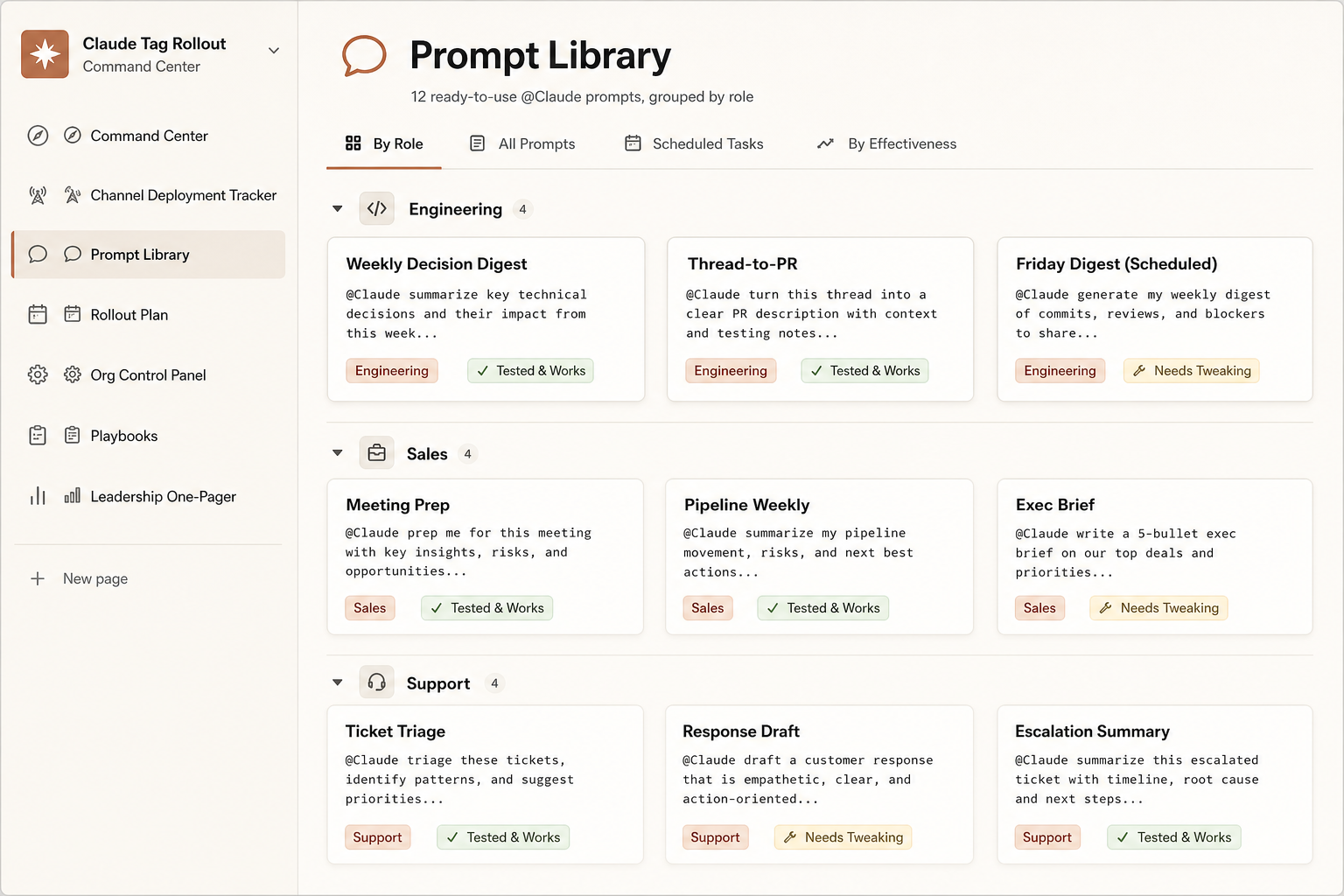
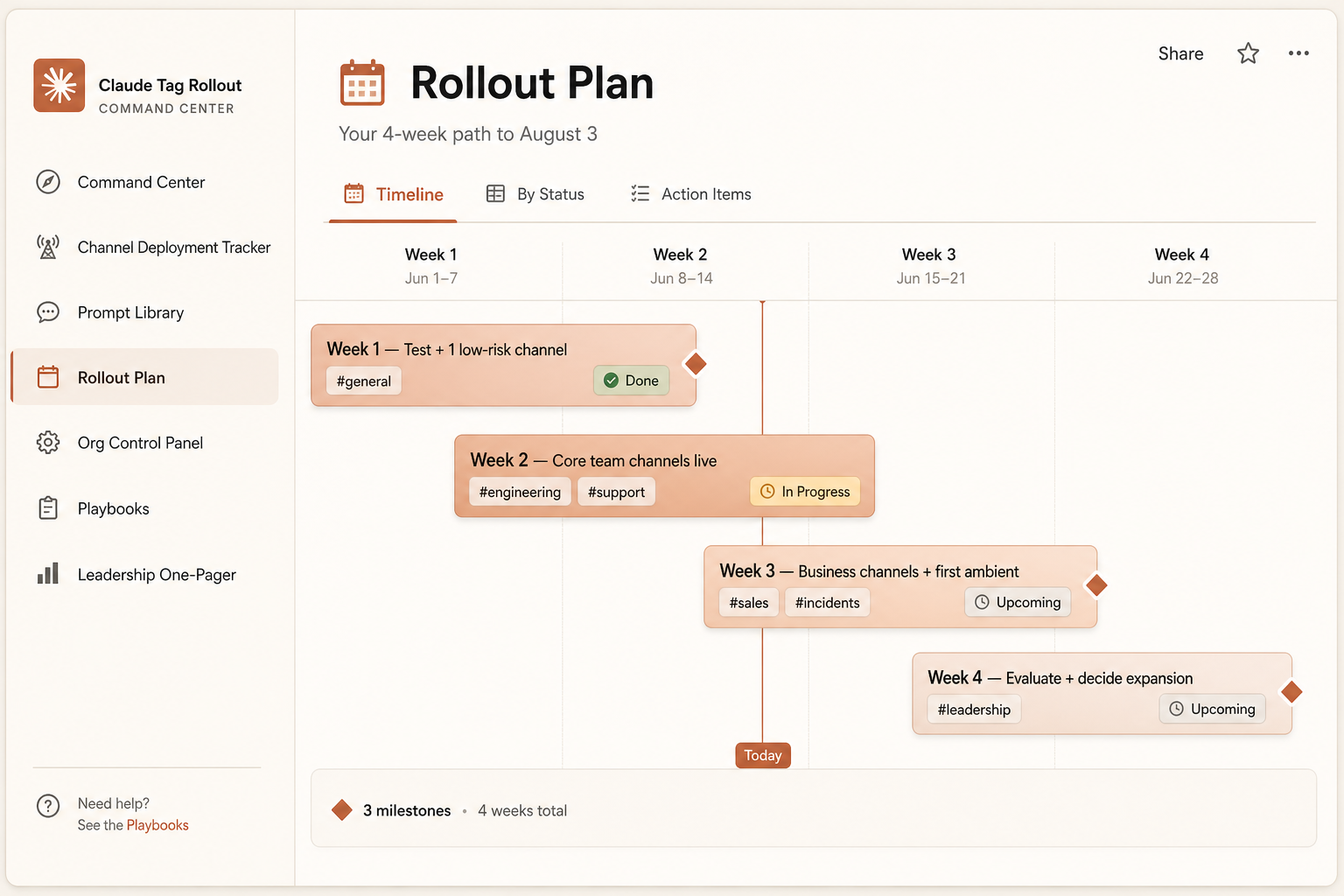
These prompts are the free slice. The full Rollout Command Center wraps the 12-prompt library with a channel tracker, a live credit runway, and a 4-week rollout plan — the system you actually run the migration from.
Pre-filled and ready the second you duplicate it: a channel tracker with risk flags, a live credit runway, a 4-week plan, the 12-prompt library, and a boss-ready one-pager.
- 12 prompts, organized by role
- Channel tracker with auto risk flags
- Live credits burn bar + runway
- 4-week rollout timeline
One-time $7 · pre-filled · 14-day refund. Independent template, not affiliated with Anthropic.
Get the full @Claude prompt pack
Every prompt on this page plus more, organized by role, with the tools each one needs — in one copy-paste sheet. No spam.
Sources & methodology
Last verified: June 26, 2026Last verified June 26, 2026. Primary source for prompts: Anthropic, Introducing Claude Tag (anthropic.com/news) and its documentation. Example outputs are illustrative — written by us to show the expected shape, not captured from the live product.