Claude Tag Permissions — Scope Every Channel Safely
**Conclusion First**: Claude Tag security is entirely channel-centric, not user-centric. Slack Owners must configure three distinct permission layers per channel: 1) Access Bundles (defining API tool reach), 2) Member Access (defining human invocation rights), and 3) Ambient/Learning Modes (governing autonomous behavior). Failure to strictly scope these settings per channel introduces severe data exposure risks.
Privilege Restriction: Only a Slack Primary Owner or Owner possesses the clearance to modify Claude Tag permissions. Standard 'Admin' roles are explicitly denied this capability.
Applicable: Claude Team & Enterprise · Status: Beta · Data: Media-verified
Risk Assessment: Is it safe to deploy @Claude here?
**Pre-Deployment Validation**: Do not guess at permission scoping. Input the parameters of a specific Slack channel below (trust tier, data sensitivity, required APIs, and autonomy needs). This client-side tool will compute the channel's inherent risk profile and output the exact configuration parameters required for safe deployment. Zero data leaves your browser.
- 1
What kind of channel is this?
- 2
Does it hold secrets, credentials, or customer data?
- 3
Which tools will Claude connect here?
- 4
Member Access mode?
- 5
Ambient mode & cross-channel learning?
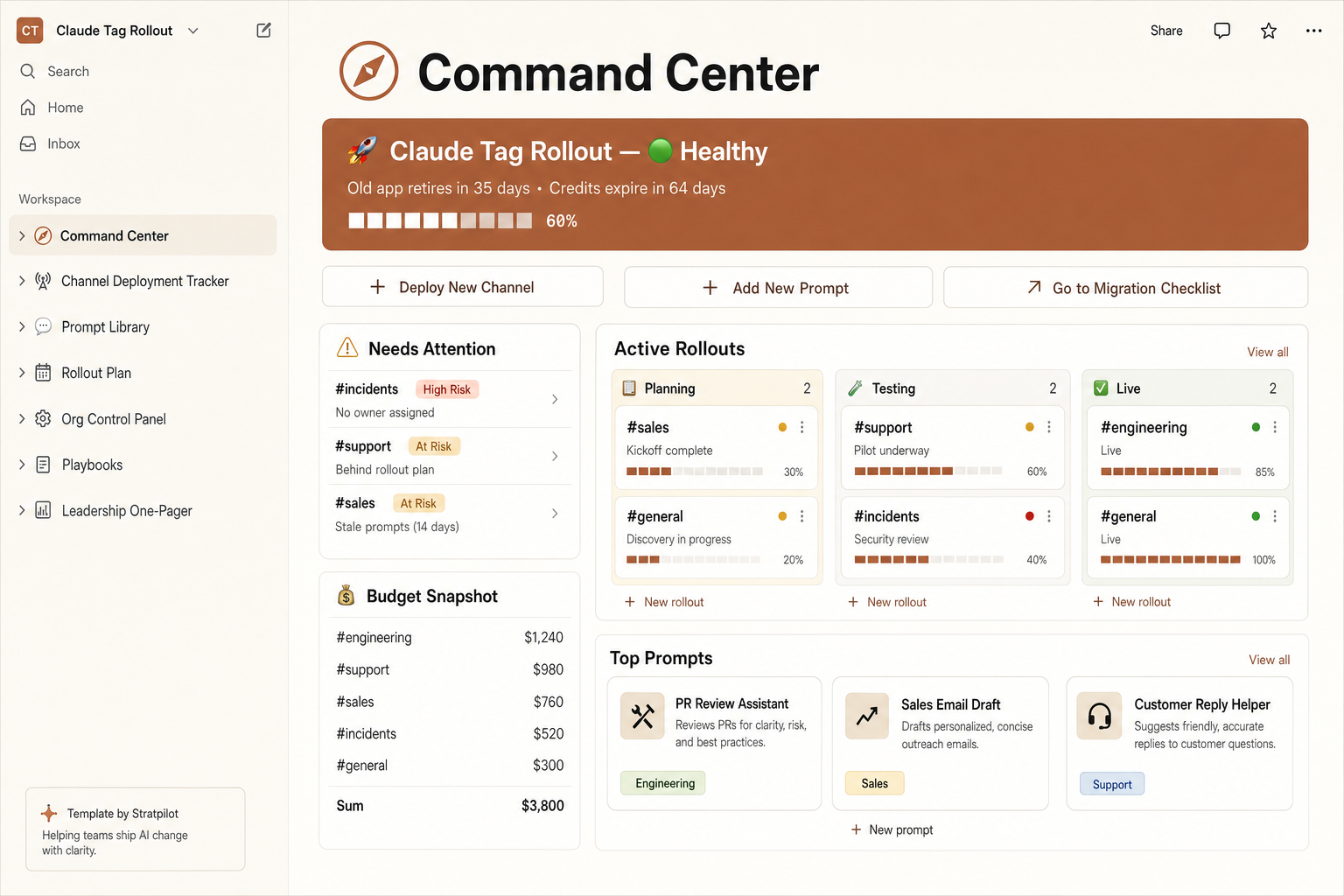
Save every channel's permission scope in one tracker
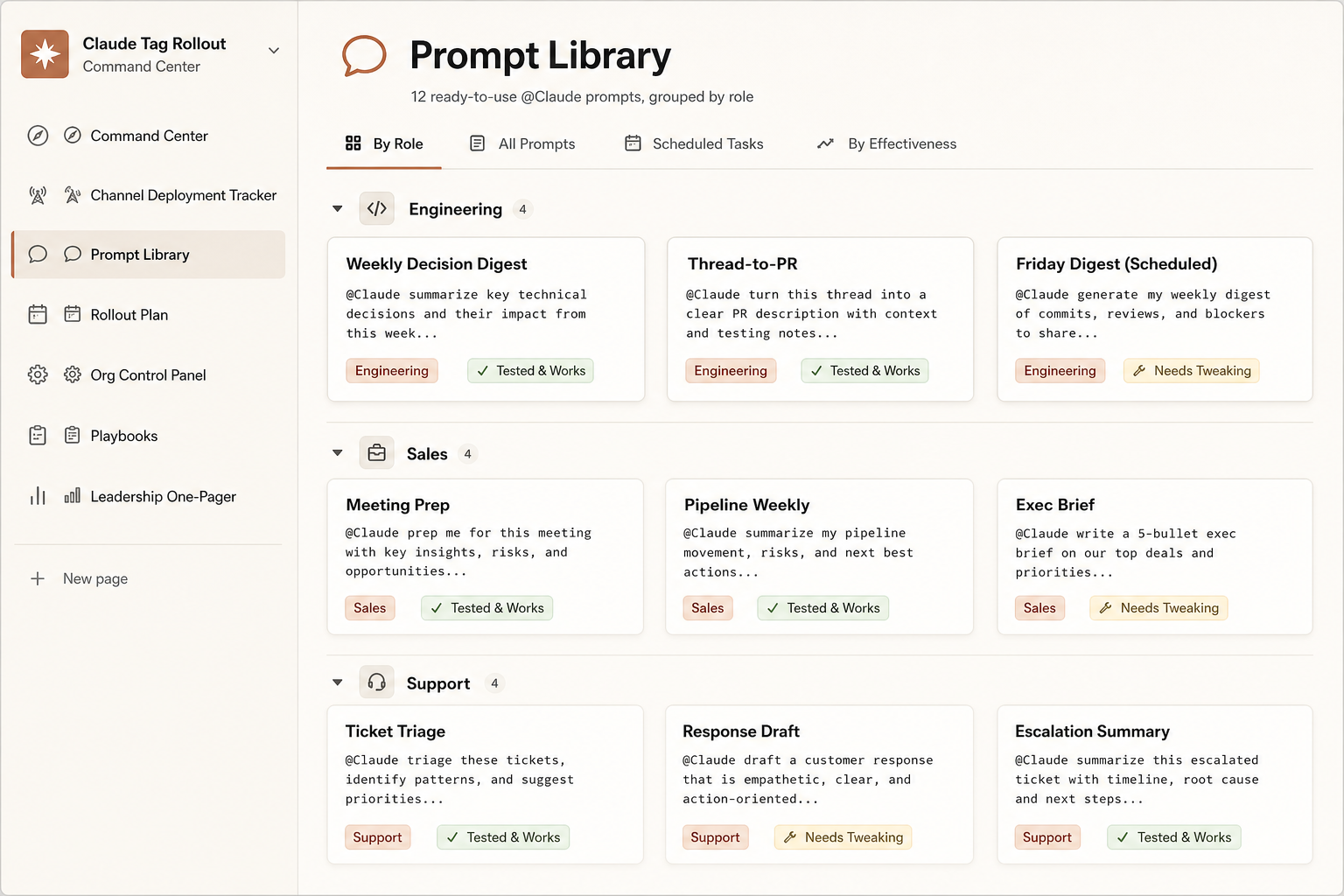
The permission checker is a one-time read. The Rollout Command Center stores each channel's scope and risk rating in a shared tracker your team can see — not a check you'll have to redo from memory next week.
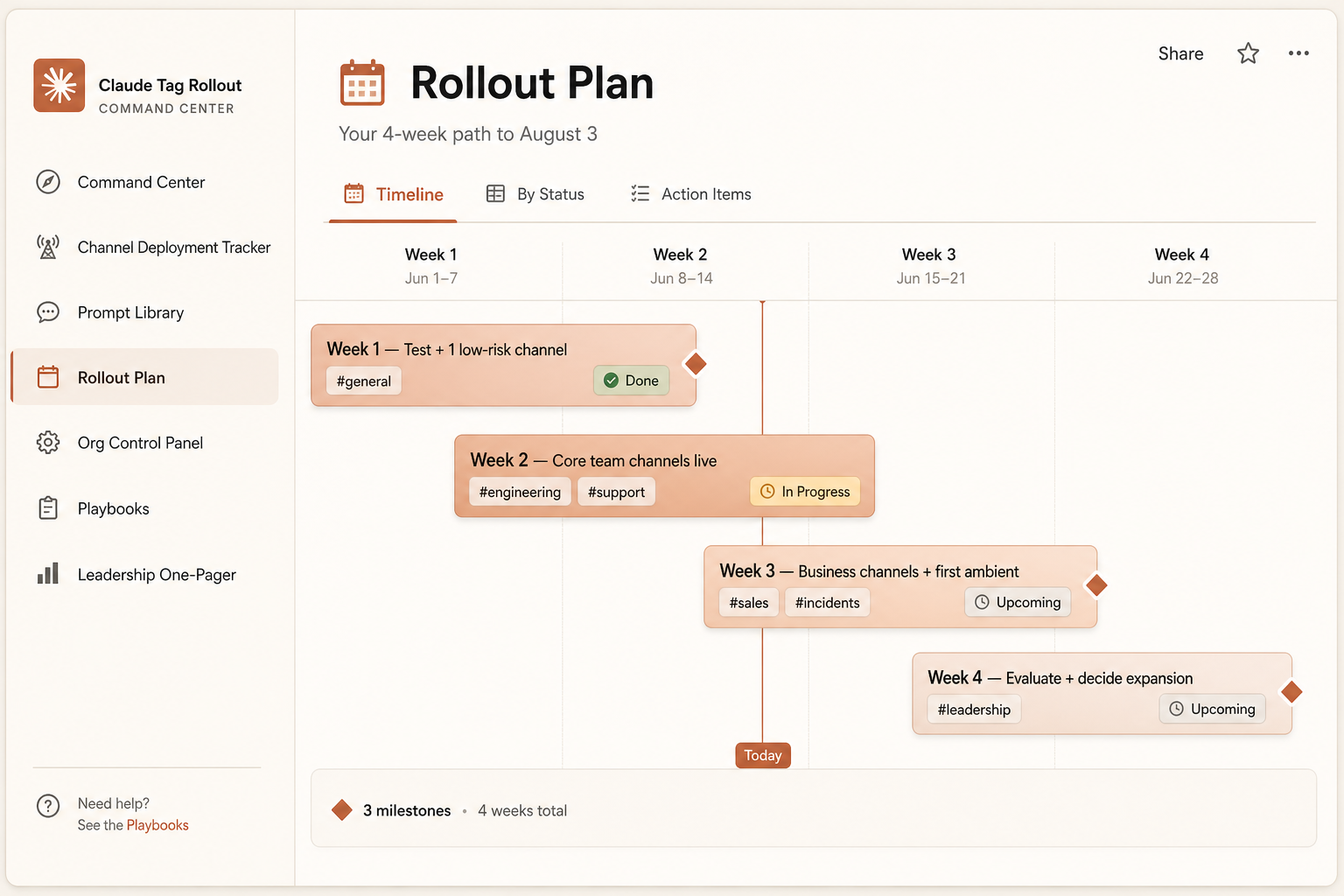
Pre-filled and ready the second you duplicate it: a channel tracker with risk flags, a live credit runway, a 4-week plan, 12 ready prompts, and a boss-ready one-pager.
- Per-channel scope + risk rating
- Auto "needs attention" flags
- Live credits burn bar + runway
- 4-week rollout timeline
One-time $7 · pre-filled · 14-day refund. Independent template, not affiliated with Anthropic.
Authorization Matrix: Who controls @Claude permissions?
**Strict Role Requirements**: Only users with the Slack 'Primary Owner' or 'Owner' designation can authorize, modify, or revoke Claude Tag permissions. Standard Slack 'Admin' accounts are structurally blocked from these operations. This is the primary bottleneck in enterprise deployments—verify your organizational role mapping before initiating a rollout.
**Continuous Governance**: Permission management is not a 'set-and-forget' operation. Owners must continuously audit channel scopes, adjust access bundles, and toggle Ambient Mode via the Claude admin console. Always provision via least-privilege: expanding access later is trivial; retracting compromised data post-incident is impossible.
Configuration Authorization
- Primary OwnerFull Authorization
- OwnerFull Authorization
- AdminDenied Access
Verify your role via `Slack Settings & Administration > Manage Members`.
The Security Foundation: Isolated Agent Identity
**Zero Impersonation**: Claude Tag explicitly rejects user credential hijacking. The AI operates exclusively via distinct, admin-provisioned service accounts (e.g., the Claude GitHub App, the Claude Slack integration). This architectural decision guarantees that an AI deployed in a public channel cannot inadvertently leverage a user's private SSO token to exfiltrate restricted data.
Immutable Audit Rule: Claude utilizes isolated service accounts, never human credentials.
Slack
Posts as the Claude app
GitHub
Opens PRs as the Claude GitHub App
Data warehouse
Queries under an admin-provisioned service account
Because Claude has its own identity, permissions are about what that identity can reach in each channel — not about which employee typed the message. You grant tools and data to the agent, scoped per channel, and the logs attribute each action to the agent plus the user who requested it. That separation is what makes scoping and auditing possible in the first place.
MediaAgent-identity details are media-reported.
API Tool Provisioning: The Access Bundle Hierarchy
**Inheritance Model**: An 'Access Bundle' defines the exact API integrations (GitHub, Jira, SQL) Claude can utilize. These bundles operate on a strict inheritance hierarchy across three tiers. Misunderstanding this hierarchy is the primary cause of over-permissioning.
Organization-Wide (Tier 1)
Universally applied across all Claude installations. · Strictly limit to benign, read-only utilities (e.g., public web search).
inherits ↓
Workspace-Level (Tier 2)
Applies to all public channels; inherits Tier 1. · Standard internal tools (e.g., generalized ticketing systems).
inherits ↓
Private Channel (Tier 3)
Isolated, additive credentials; inherits Tier 1 & 2. · Highly sensitive integrations (e.g., financial databases, production deployment keys).
The Over-Permissioning Trap
Granting broad, Organization-Wide access on Day 1 creates massive technical debt. Never attach your entire GitHub repository at the Org level if only a single `#dev-ops` channel requires it. Provision access at the lowest, most restrictive layer possible.
MediaAccess bundle layering is media-reported (AgentConn, DataCamp).
Invocation Rights: Configuring Member Access
**Human Authorization**: 'Member Access' dictates *who* is allowed to trigger @Claude within a specific channel. Administrators must select the most restrictive mode viable for operations. Note: Role-Based Access Control (RBAC) requires the Enterprise tier.
Critical Limitation: Channel-Level Granularity Currently, Claude Tag operates on channel-level, not per-user tool controls. If a user is authorized to post in a channel, they inherit the ability to utilize *every* API tool connected to that channel. You must secure the channel infrastructure, as per-user API restrictions are not yet deployed.
MediaGranularity limit reported by hands-on coverage (AgentConn/HN).
Data Isolation: Preventing Cross-Channel Context Bleed
**Memory Segregation**: Claude Tag dynamically learns from channel interactions to improve context. Public-channel memory is shared across the workspace; private-channel memory is strictly cryptographically isolated. Administrators must manually disable 'Cross-Channel Learning' to prevent data contamination between sensitive environments.
Safe Memory Pooling
- Public-channel memory (Workspace-wide)
- Cross-channel learning restricted to internal, non-sensitive teams
- Explicitly whitelisted knowledge base integrations
Mandatory Isolation (Learning OFF)
- Multi-client architectures (e.g., Client A vs. Client B channels)
- Legal, HR, Finance, and PII-bearing environments
- Strict enforcement of private-channel memory isolation
The Enterprise Redline: Cross-channel context bleed is a critical security failure. A unified 'shared brain' across multiple client channels guarantees that Client A's proprietary data will eventually surface in Client B's thread. You must isolate sensitive workflows by explicitly disabling cross-channel learning, ensuring contextual silos remain unbreached.
Ambient mode permissions — when to keep it off
Ambient mode lets Claude act without being tagged — monitoring a channel, flagging cross-channel updates, and following up on quiet threads. Keep it off by default. Turn it on only where all the data is yours (internal-only channels), and never on client-facing or regulated ones.
Two reasons to be cautious
Proactivity multiplies exposure — Claude is acting on its own judgment, not your explicit request — in a sensitive channel that multiplies what's exposed.
Attribution gets harder — When Claude acts autonomously across channels, tracing which instance triggered an action is messier, and the audit trail for cross-channel ambient actions is still immature.
Ambient mode
Off by default
Enable only — internal-only channels where all the data is yours
Never — client-facing or regulated channels
Anthropic recommends keeping it off until your team understands the failure modes.
Per-channel scoping worksheet — internal / client / regulated redlines
The riskiest mistakes aren't technical — they're scope. Mark each channel as internal, client-facing, or regulated, then apply the redlines below. List your channels, set each one's defaults, and export the worksheet as your rollout plan.
Set Member Access to the narrowest mode that still works. Turn ambient on only where proactive nudges clearly earn their keep and the data is fully internal. Grant cross-channel learning per channel, not globally. Connect write tools only where a human reviews the output. And keep a person on the button for anything irreversible — deploys, customer messages, data changes.
Everything stays in your browser — labels are optional and never uploaded.
Audit log & accountability — tracing who triggered what
Every action Claude takes is logged. Under Organization settings > Claude Tag > Audit, you can see every scheduled and one-time task, which user requested it, and every network call made with Claude's agent credentials. Because Claude acts under its own identity, a GitHub PR even links back to the Slack thread that triggered it.
Network allowlists
Tool credentials are stored separately, tied to a channel, and injected only at the network boundary when a request needs them; outbound traffic to non-allowlisted hosts is blocked.
Memory governance
Admins can view, edit, and delete channel and workspace memory, and on disconnect it's deleted from Claude's systems within 30 days.
Spend caps
Double as a usage boundary (next section).
MediaAudit, network-allowlist & memory details are media-reported.
Spend limits as a permission boundary
Spend is a permission control, not just a budget. Claude Tag billing is consumption-based, so set an organization hard cap plus per-channel limits — new channels inherit a default. Alerts fire at 75% and 95%, and an over-limit task is declined outright rather than silently cut short.
Spend caps
New channels inherit a default cap · per-channel cap = blast-radius limit
Treat a tight per-channel cap as a blast-radius limit: even if a channel is mis-scoped, it can't run up unbounded usage. A blocked user can ask an admin for more budget right in Slack, so set caps low enough to catch runaway usage but high enough that real work isn't blocked. Read the per-channel breakdown to rebalance.
Claude Tag permissions FAQ
Who can change Claude Tag permissions?
Only a Slack Primary Owner or Owner — the Admin role can't. They can re-scope channels, swap access bundles, and toggle ambient mode at any time in the Claude admin console.
What is a Claude Tag access bundle?
A named set of service-account credentials, tool grants, and instructions Claude uses in the channels it covers. Bundles inherit across three layers: organization-wide, workspace, and private channel.
Can Claude Tag read our private channels?
Only if an admin explicitly adds it. Claude doesn't report from private channels, and private-channel memory stays isolated from other channels.
What are the Member Access modes?
Three: anyone in the Slack workspace (broadest), any member of your Claude org (narrower), or role-based access (tightest, available on Enterprise).
Can I limit which users use a specific tool?
Not today. Access is channel-level, not per-user — if someone can post in the channel, they can use the tools connected there. Scope the channel, not the person.
Will one channel's data leak into another?
Cross-channel learning is permission-gated per channel and off for private channels. Grant it only between channels that can safely share, and never from client or regulated channels.
Should ambient mode be on?
Off by default. Enable it only on internal-only channels where all the data is yours — never client-facing or regulated ones, where attribution and exposure risk rise.
Is there an audit log?
Yes. Org settings > Claude Tag > Audit logs every task, the user who requested it, and network calls made with Claude's credentials. A GitHub PR links back to its Slack thread.
How are tool credentials protected?
They're stored separately, tied to a channel, and injected only at the network boundary when a request needs them. Outbound traffic to non-allowlisted hosts is blocked.
Can a channel blow our budget?
Set org-wide and per-channel spend caps. Alerts fire at 75% and 95%, and an over-limit task is declined rather than silently cut. Per-channel caps act as a blast-radius limit.
What happens to Claude's memory if we disconnect?
Admins can view, edit, and delete channel and workspace memory anytime. On disconnect, it's deleted from Claude's systems within 30 days; Slack conversations follow your existing retention policies.
Is this page official?
No — this is an independent guide with sources. Always verify the current permission options in your Anthropic/Claude admin console.
Get the permission redline checklist
We'll email you a one-page permission redline checklist (internal / client / regulated defaults) plus a heads-up when Claude Tag's permission options change during the beta. No spam, unsubscribe anytime.
Sources & how we keep this accurate
The base definitions are from Anthropic's Claude Help Center; permission specifics — access bundles, Member Access modes, audit, network, and memory behavior — are from hands-on coverage and may change during the beta. Risk levels and recommended settings are our guidance, not a compliance guarantee. Last verified June 26, 2026.
Primary sources:
Fact status: Official · Media · Guidance. Not affiliated with Anthropic or Slack — confirm current options in your Claude admin console, and keep a human in the loop for irreversible actions.